On this page
- What lead nurturing is, and what it is not
- Step 1: Choose the trigger that starts the sequence
- Step 2: Plan five emails, each with one job
- Step 3: Branch on behavior, not on guesses
- Step 4: Find your hot leads with segments
- Step 5: Sunset the contacts who never engage
- Let AI draft the copy, keep the strategy yours
- Building it in Send Tim
- The metrics that tell you it is working
Capturing a lead is the start of the work, not the end of it. Most new subscribers are not ready to buy on the day they sign up; they are curious, comparing options, or solving a problem they have not fully defined yet. Lead nurturing is how you stay useful to them until they are ready, without a salesperson chasing every signup by hand.
This guide walks through building a nurturing sequence that reacts to what each person does: the trigger that starts it, the five emails that do most of the work, the branches that adapt it, and the exit that protects your sender reputation. If you have not built the signup side yet, start with our guide to email lead generation.
What lead nurturing is, and what it is not
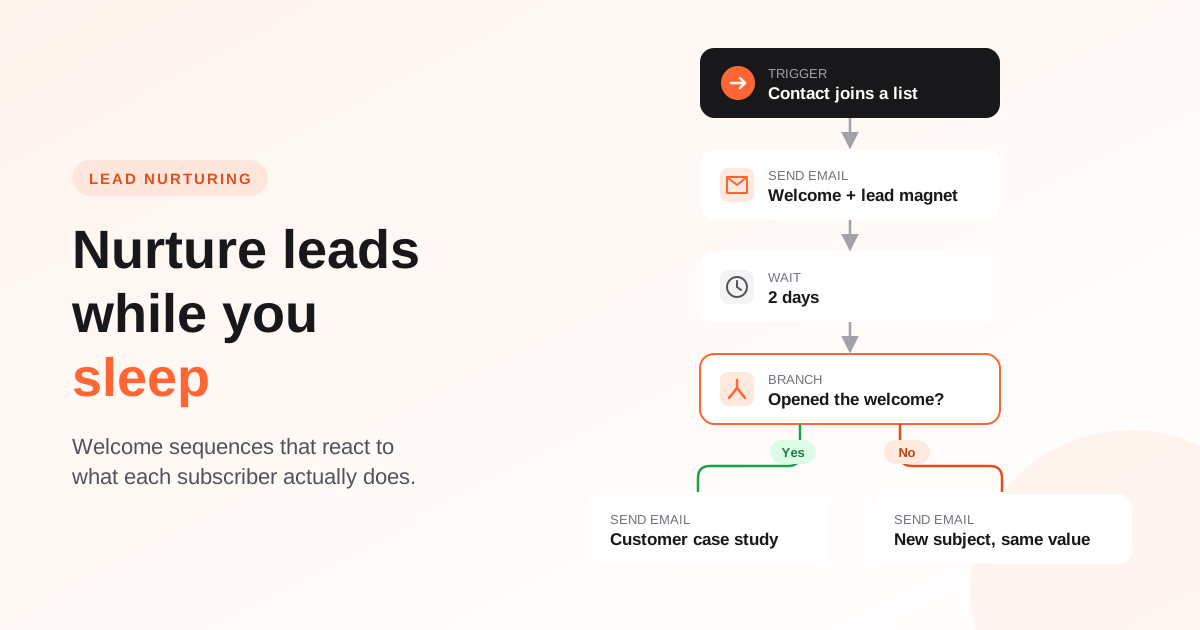
A drip campaign sends the same emails to everyone on a fixed schedule. A nurturing sequence starts from the same idea but listens along the way: someone who clicks through to your pricing page gets a different next email from someone who has not opened anything in a week.
It is also not a countdown to a hard sell. The emails that convert best in a welcome sequence are usually the ones that solve a small problem immediately. Earning the second click is what makes the offer on day nine land.
Step 1: Choose the trigger that starts the sequence
The trigger decides who enters and when. Pick the moment that best signals intent:
- Contact joins a list: the classic welcome trigger, fired by a signup form or an import into a specific list.
- Contact enters a segment: for anything defined by rules, for example "trial users on the Pro plan" or "customers with no order in 90 days".
- Contact clicks a campaign: a strong intent signal. Someone who clicked the pricing link in your newsletter deserves a short follow-up, not the next newsletter.
- Contact is created: the broadest trigger, useful when every new contact should get the same onboarding.
Step 2: Plan five emails, each with one job
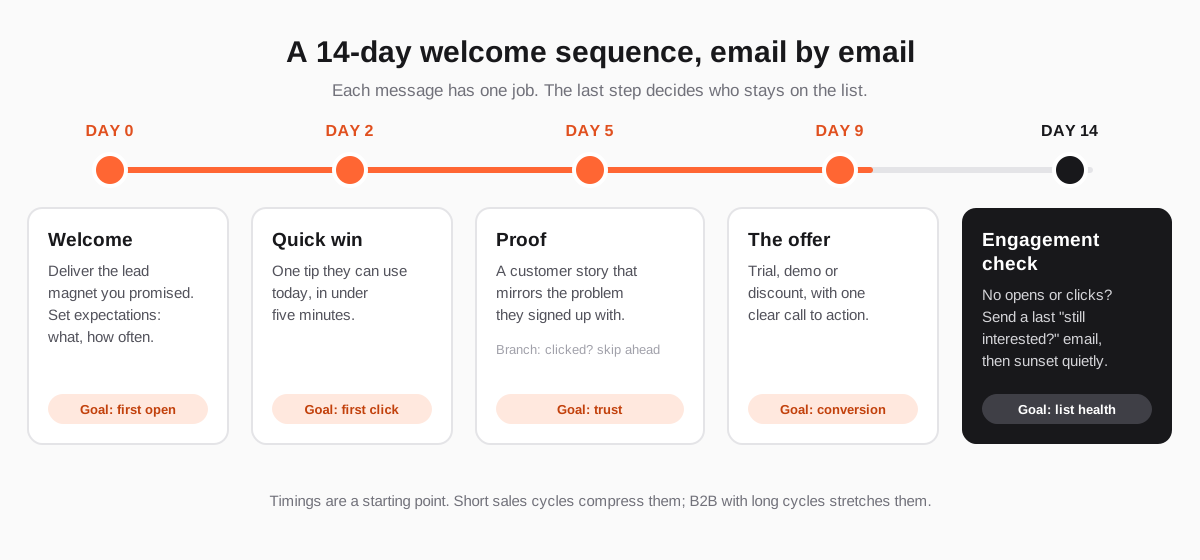
Five emails over two weeks is a reliable starting shape. It is long enough to build familiarity and short enough that the offer arrives while the signup is still fresh.
Email 1 (day 0): the welcome
Send it immediately. Deliver what you promised, the checklist, the discount code or the first lesson, in the first line. Then set expectations: what you will send, how often, and why it is worth opening. Example subject line: "Your pricing checklist is inside".
Email 2 (day 2): the quick win
One practical tip that takes less than five minutes to apply. The goal is a click and a small success the reader associates with your name. Example: "The 5-minute fix for your onboarding email".
Email 3 (day 5): the proof
A short customer story that mirrors the problem the subscriber signed up with: the situation before, what changed, the result. Specific beats impressive; a concrete story from a company like theirs is more persuasive than a big logo.
Email 4 (day 9): the offer
Now ask. A trial, a demo, a first-order discount: one offer and one call to action. Explain who it is for and what happens after they click, so the step does not feel bigger than it is.
Email 5 (day 14): the engagement check
Anyone who has not opened or clicked anything by now gets one last, honest email: "Still want to hear from us?" with a single button to stay. Those who ignore it too are moved out of your regular sends. More on why below.
Step 3: Branch on behavior, not on guesses
Branches are what turn a drip into nurturing. After each important email, add a condition and send people down different paths:
- Clicked the offer? Skip the rest of the pitch and move them to onboarding or a sales follow-up.
- Did not open the welcome? Resend the same value with a new subject line two days later. Do this once, not repeatedly.
- Clicked a specific topic? Route them to the variant of the next email that goes deeper on that topic.
Step 4: Find your hot leads with segments
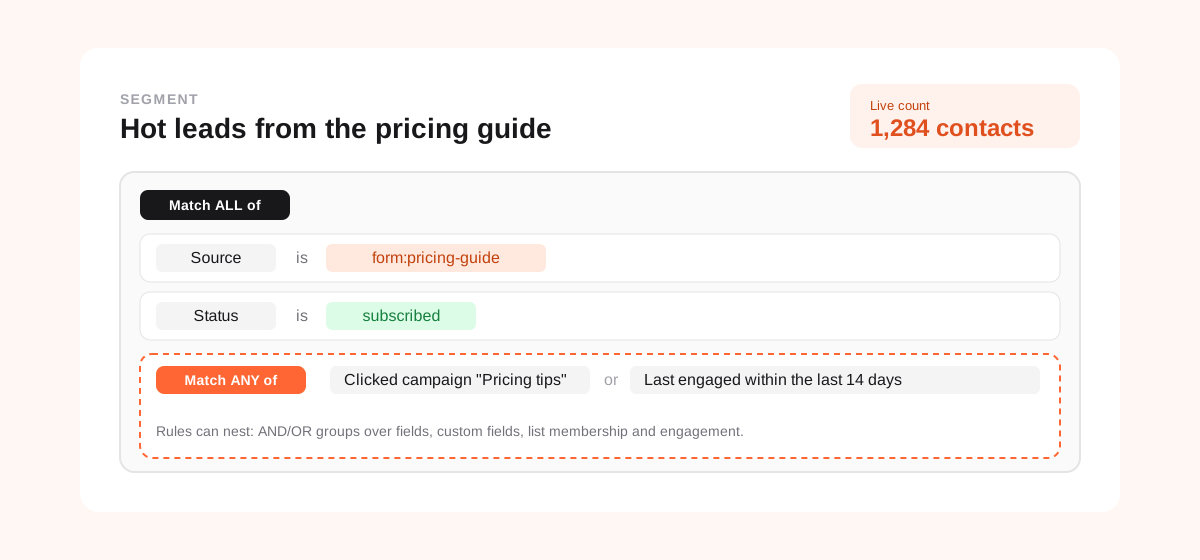
A sequence handles individuals one step at a time. Segments let you look at everyone at once. Combine where people came from with what they have done since, and you get a live list of the leads most worth a personal email or a sales call:
- Source is a specific form or lead magnet, so you know what they were interested in.
- Engagement within the last 14 days, or a click on a specific campaign.
- Custom fields such as company size or plan interest, if your form asked for them.
A segment can also be a trigger. "Contact enters the Hot leads segment" can start a short, direct sequence from a named person on your team, which tends to convert far better than another newsletter.
Step 5: Sunset the contacts who never engage
It feels wrong to stop emailing people who signed up. But mailbox providers decide where your email lands largely by how recipients react to it, and a growing block of subscribers who never open or click tells them your mail is not wanted. That hurts delivery to the people who do want it.
A sunset policy solves this deliberately: after a defined period without engagement and a final re-permission email, the contact stops receiving regular campaigns. They are not deleted and can come back by signing up again. Your list gets smaller and your results get better.
Let AI draft the copy, keep the strategy yours
Five emails with a couple of branch variants is ten or more pieces of copy. This is where an AI writing assistant earns its place: describe the audience, the offer and the call to action, and get a complete first draft with several subject lines to test. Your job moves from writing from a blank page to editing for voice and accuracy, which is a far better use of an afternoon.
What AI should not decide is the structure: who enters, what each email is for and when someone leaves. That is strategy, and it is the part that makes the sequence work.
Building it in Send Tim
Send Tim automations are built step by step in a visual builder and run in the background, one step at a time, for every contact who enters.
- Triggers: contact created, joins a list, enters a segment, opens or clicks a campaign, or added manually.
- Steps: wait, send email, branch, engagement check, sunset and exit.
- Branch conditions: opened or clicked the previous email, any email in the flow, or a specific campaign.
- Re-entry rules stop a contact from being caught in the same journey twice.
- Segments with nested AND/OR rules over contact fields, custom fields, list membership and engagement, with a live count before you save.
- AI campaign drafts return at least three subject lines, preview text and a plain-text version, all editable in the email editor.
The metrics that tell you it is working
- Click rate per email, the most honest measure of whether each message did its job.
- Conversion rate of the sequence: the share of entrants who took the offer within, say, 30 days.
- Time to conversion: if most buyers convert after email 2, move the offer earlier.
- Unsubscribe and complaint rates: a spike on one email points at the exact message to rewrite.
- Share of contacts sunset: if it keeps rising, the problem is upstream, in the signup offer or the audience it attracts.
Change one thing at a time, give each change a few hundred entrants, and keep notes. A good welcome sequence is never finished, but after two or three rounds of changes it usually becomes the best-performing email you send.
Frequently asked questions
How many emails should a lead nurturing sequence have?
Five emails over roughly two weeks is a sensible starting point for a welcome sequence: welcome, quick win, proof, offer and an engagement check. Longer B2B sales cycles can extend the sequence with more educational content, but each email should still have one clear job.
What is the difference between a drip campaign and lead nurturing?
A drip campaign sends the same emails to everyone on a fixed schedule. Lead nurturing adapts the sequence to each person: it branches on clicks and opens, skips ahead when someone shows buying intent, and stops when someone stops engaging.
Should I branch automations on opens or on clicks?
On clicks whenever the decision matters. Apple Mail Privacy Protection and similar image-proxy features record many opens that were not made by a person, so opens are approximate. They are still useful for spotting trends and for a 'did not open, resend' step.
When should I stop emailing unengaged subscribers?
Set a sunset policy: after a defined period with no opens or clicks, send one re-permission email, and stop regular sends to anyone who ignores it. The right period depends on how often you send, but most senders use somewhere between 60 and 180 days.