On this page
For a couple of years, "AI email marketing" meant a writing box inside your email tool: describe the campaign, get a draft, paste it into the editor. Useful, but limited to whatever model the vendor picked, and blind to everything outside that box.
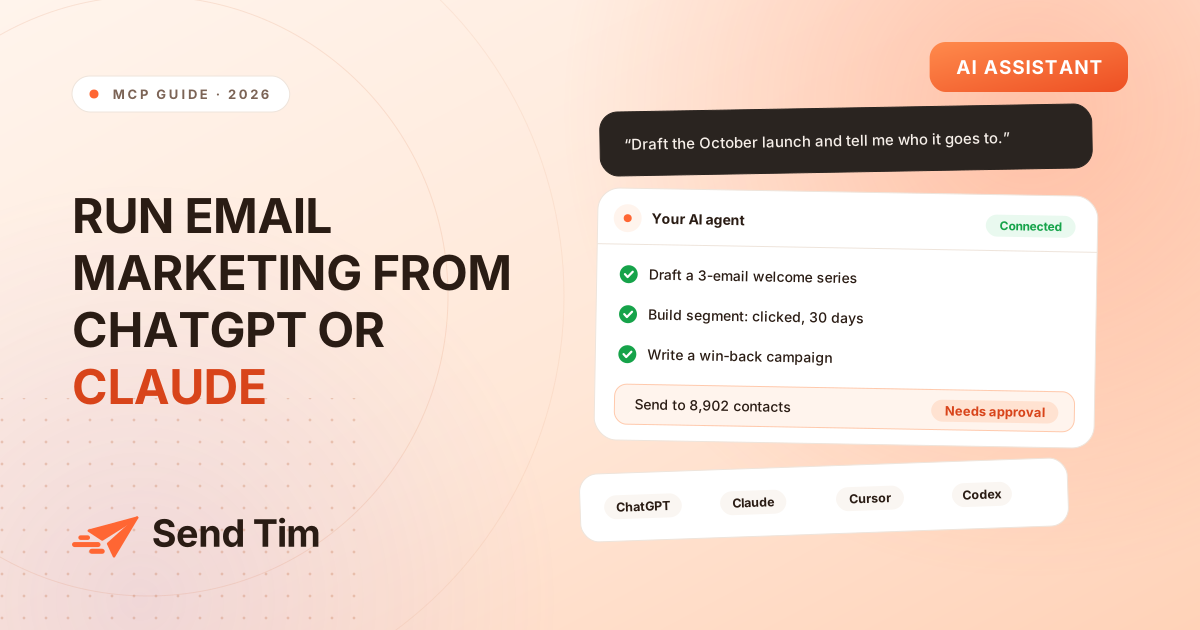
The more useful setup is the reverse: keep the AI assistant you already use for everything else, and let it work inside your email platform. That is what MCP makes possible. This guide explains how it works, how to connect the main assistants, which prompts produce good results, and what to keep under human control.
What is MCP?
The Model Context Protocol is an open standard, introduced by Anthropic in November 2024 and since adopted widely, including by OpenAI, for connecting AI assistants to external tools and data. An application publishes an MCP server describing the operations it offers; an assistant connects to it and can call those operations on your behalf.
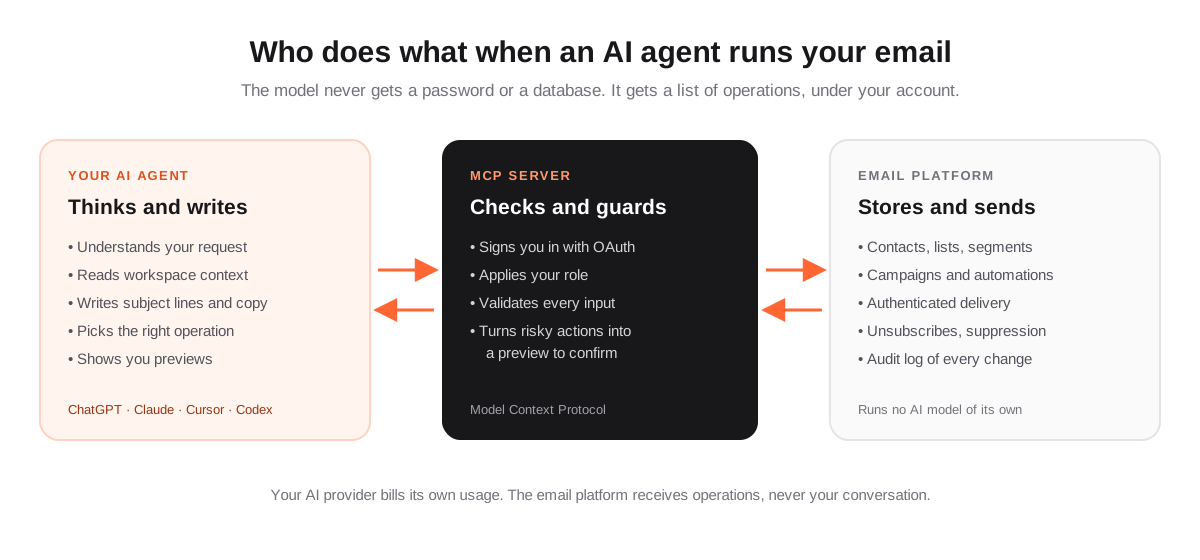
For email marketing, that means the assistant can read your lists and segments, check how many contacts a rule matches, write a campaign into your workspace, build an automation or pull a performance report, with the same permissions you have, and nothing more.
Why run email marketing from your AI assistant?
- Use the model you already pay for. Whichever assistant your team prefers, and whichever model is best next year, keeps working with the same email platform.
- Context beyond the email tool. Your assistant can draw on the product notes, launch plan or customer research you have shared with it, and turn them into a campaign in the same conversation.
- Less clicking for multi-step work. "Build a segment of trial users who clicked pricing, draft a three-email sequence for them and show me the audience size" is one request instead of twenty screens.
- Analysis in plain language. Ask "which campaign had the best click rate this month, and what did its subject line do differently?" instead of exporting a report.
- No AI metering in your email bill. The AI provider bills its own usage; the email platform does not need to resell tokens.
How to connect your AI assistant
Every client connects to the same remote MCP server URL and signs in through your browser the first time. For Send Tim, the URL and the latest instructions are in Settings → AI agents and in the guide Connect your AI agent (MCP).
| Assistant | Where to add it | Notes |
|---|---|---|
| ChatGPT | Settings → Apps & Connectors, with Developer mode on; create a connector with the server URL. | Custom connectors depend on your ChatGPT plan and workspace settings. |
| Claude (desktop and claude.ai) | Settings → Connectors → Add custom connector. | Select Connect, then sign in and approve access. |
| Claude Code | Run claude mcp add --transport http --scope user sendtim <server URL>. | Then run /mcp inside Claude Code to sign in. |
| Codex | Run codex mcp add sendtim --url <server URL>. | Then codex mcp login sendtim. |
| Cursor | Cursor Settings → MCP, or ~/.cursor/mcp.json. | Select "Needs login" next to the server to sign in. |
| Other MCP clients | Add the URL as a remote Streamable HTTP server. | Clients without OAuth can use a workspace API key as a bearer token. |
Prompts that work, by task
Good prompts for an email agent read like a brief to a colleague: who it is for, what should happen, and what you want to check before anything goes out.
Audience and segments
- "Create a segment of subscribed contacts who joined from the pricing guide form and clicked any email in the last 30 days. Tell me how many match before saving."
- "How many contacts have not engaged in 90 days? Break it down by list."
- "Which subscribed contacts are on the Customers list but not on the Product updates list?"
Campaigns
- "Draft a campaign announcing our new integrations page to the Newsletter list. Friendly, under 150 words, one button. Give me three subject lines to choose from."
- "Send me a test of the draft, then schedule it for Tuesday at 10:00 in my time zone once I approve."
- "Duplicate last month's product update and rewrite it for the October release notes I pasted above."
Automations
- "Create a three-email welcome series for people who join the Newsletter list: welcome on day 0, a quick tip on day 2, a customer story on day 5. Leave it paused."
- "Build a re-engagement flow for contacts inactive for 90 days, with one check-in email and suppression for those who do not click."
- "How is the onboarding automation performing? How many contacts are in it and how many emails has it sent?"
Reporting and analysis
- "Which three campaigns had the best click rate this quarter? What do their subject lines and calls to action have in common?"
- "Compare form conversion rates across our signup forms and suggest which one to improve first."
- "Summarize audience growth this month: new subscribers, unsubscribes, bounces and complaints."
What stays under your control
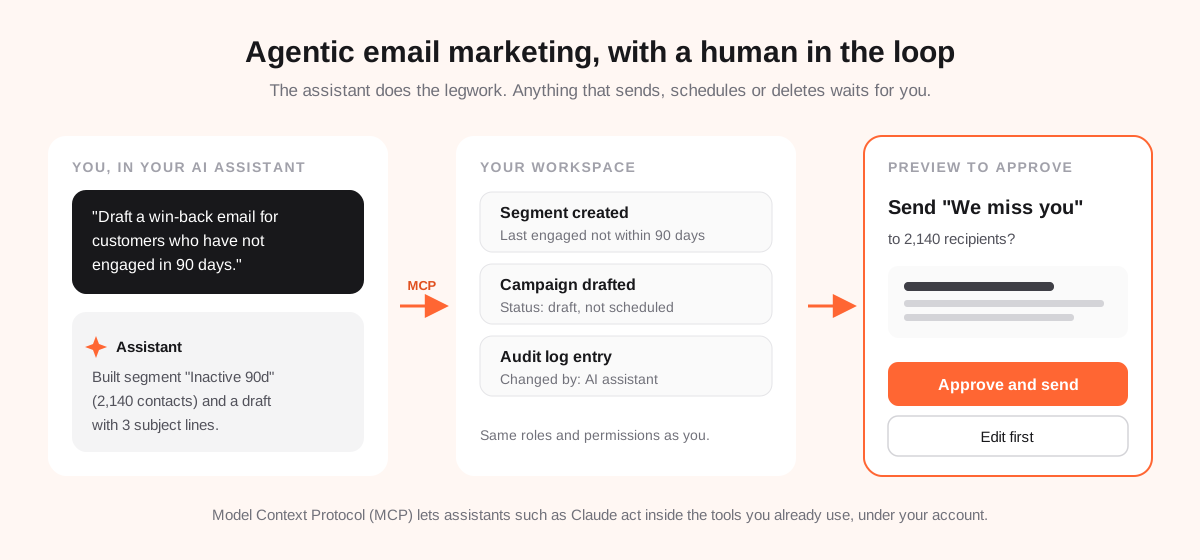
Giving an AI assistant access to your customer list is a reasonable worry. A well-designed MCP server answers it with rules the assistant cannot talk its way around:
- Previews for anything irreversible. Emailing people, scheduling a send, activating an automation or deleting data returns a preview first. The assistant has to show it to you and get your go-ahead before it runs.
- Your role, not more. The assistant acts as you. It sees only your workspaces and can do only what your role allows; sending a campaign still needs the admin role.
- An audit trail. Every change is recorded in the workspace audit log and marked as made through MCP.
- Instant revocation. Removing someone from a workspace ends their assistant's access to it immediately.
- Some things stay in the dashboard. Workspace settings, billing and CSV imports are not exposed to assistants at all.
Tips for better results
- Give it your voice once. Paste a short brand voice note and a past email you liked, and ask it to match them for the rest of the conversation.
- State the claims it may not make. Prices, guarantees, legal wording: tell it what is off limits, then check the draft anyway.
- Ask for the audience size before any send. A number that looks wrong is the cheapest bug to catch.
- Review in the editor. Drafts land in your workspace as normal campaigns, fully editable in the visual editor. Use it for the last mile.
- Always send a test. Ask the assistant to send one to you before you approve the real send.
How it works in Send Tim
Send Tim runs a remote MCP server and no AI model of its own. Your assistant does the thinking and writing; Send Tim lays the copy out in your branding, sends it through your authenticated domain, and enforces unsubscribes and suppression. Connecting an agent is available on every plan, including Free, with no AI credits to buy.
- Operations across contacts, lists, segments, campaigns, automations, templates, forms and analytics.
- Workspace context the assistant can read before acting: sender, lists, segments and merge tags, plus the product guides.
- Ready-made workflows for a welcome series, a re-engagement flow, a product launch campaign and a campaign performance review.
- Simple copy or HTML in, branded email out: assistants never need to write email builder JSON.
For where this is heading over the next year, read The Future of Email Marketing: 8 Trends That Will Shape 2027.
Frequently asked questions
Can ChatGPT or Claude send my email campaigns?
Yes, when they are connected to an email platform that offers an MCP server. The assistant can create the campaign, choose the audience, send a test and schedule or send it. A well-designed server returns a preview for any send and waits for your explicit approval before anything goes out.
Is it safe to give an AI assistant access to my email list?
It can be, if the connection is built for it: the assistant signs in as you with OAuth, inherits only your role and workspaces, every change is logged, and irreversible actions such as sending or deleting require your confirmation. Avoid setups that share passwords or give an assistant broader access than your own.
Do I need to buy AI credits from my email platform?
Not with an MCP-based setup. The reasoning and writing happen in your own AI assistant, which bills its usage through your existing ChatGPT, Claude or other subscription. Send Tim charges for contacts and sending, not for AI.
Which AI assistant is best for email marketing?
Any assistant that supports remote MCP servers with OAuth works, including ChatGPT, Claude, Claude Code, Codex and Cursor. Choose the one your team already uses and trusts with your company context; the quality of your brief matters more than the brand of the model.
What is an MCP server?
An MCP server is the part of an application that exposes its features to AI assistants using the Model Context Protocol. It lists the operations available, checks who is calling them, and runs them on that person's behalf.