On this page
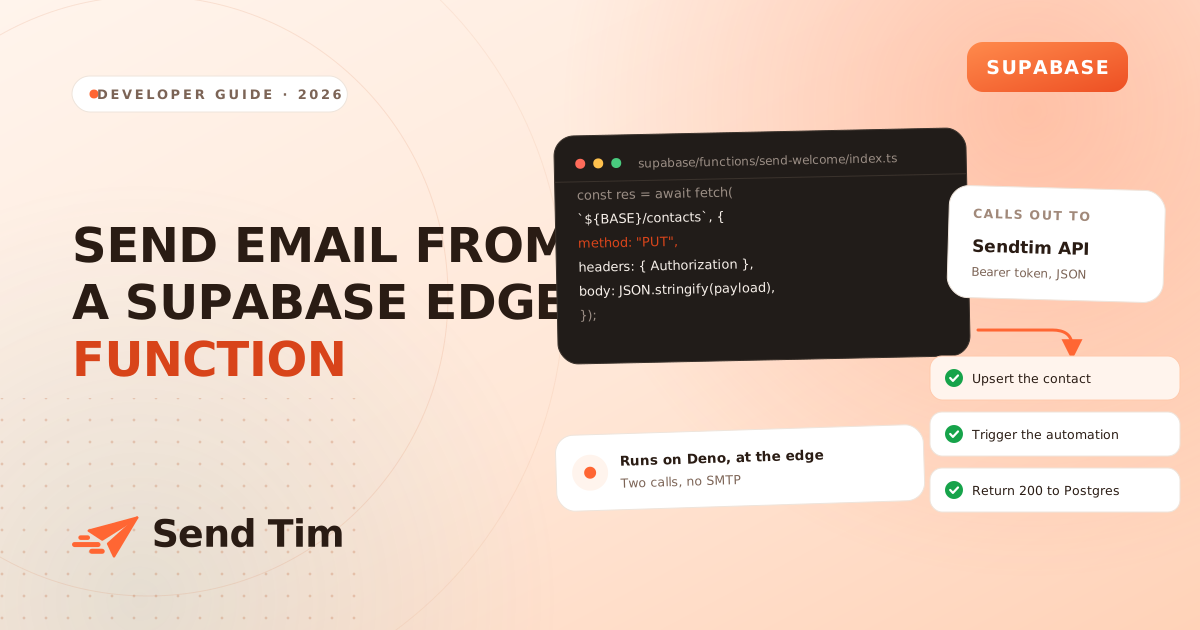
Supabase gives you auth, a database and somewhere to run code, and then stops exactly where most products need one more thing: telling the user something happened. A welcome email after signup, a receipt after a payment, a notification when a row changes. There is no mail server in the box, and the Deno runtime that Edge Functions use cannot open an SMTP socket the way a Node process can.
The answer is to call an email API over HTTPS, which Deno is perfectly happy to do with the built-in fetch. This guide builds the whole path: the function, the secret, the database trigger that calls it, the failure handling that stops it retrying forever, and how to run it on your laptop before it ever touches production.
What calls what
Before writing any code, it is worth being clear about which component is responsible for what, because the most common mistake here is architectural rather than syntactic.
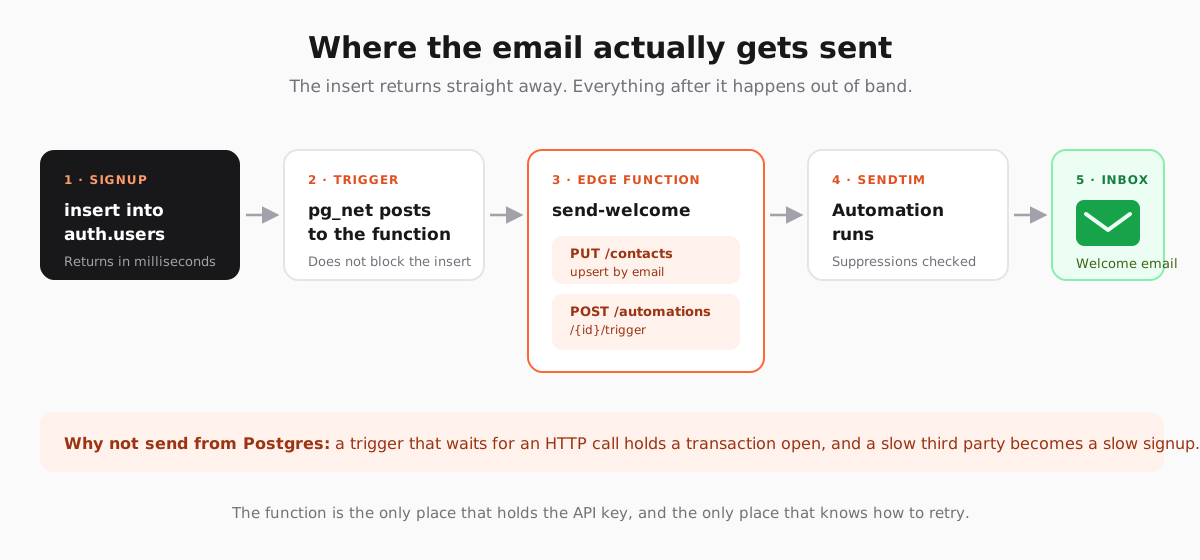
The Edge Function is the only component holding the API key, the only one that knows how to retry, and the only one that has to change when the email provider does. The database just says "this happened" and gets on with its life.
The Edge Function
Create it with supabase functions new send-welcome. The whole thing is two requests behind a small helper that turns a failed response into a thrown error, because fetch resolves happily on a 500 and silent failure is the thing you are trying to avoid.
const API = "https://sendtim.com/api/v1";
const API_KEY = Deno.env.get("SENDTIM_API_KEY")!;
const WELCOME_AUTOMATION = Deno.env.get("WELCOME_AUTOMATION_ID")!;

class ApiError extends Error {
  constructor(readonly status: number, message: string) {
    super(message);
  }
}

async function api<T>(path: string, body: unknown, method = "POST"): Promise<T> {
  const response = await fetch(`${API}${path}`, {
    method,
    headers: {
      Authorization: `Bearer ${API_KEY}`,
      "Content-Type": "application/json",
    },
    body: JSON.stringify(body),
  });

  if (!response.ok) {
    // The error shape is { error: { code, message } }.
    const detail = await response.text();
    throw new ApiError(response.status, `${method} ${path}: ${detail}`);
  }

  return response.json() as Promise<T>;
}

Deno.serve(async (request) => {
  const { email, firstName, plan } = await request.json();

  // Upsert, not create: a retry updates the contact instead of failing.
  const contact = await api<{ id: string; created: boolean }>(
    "/contacts",
    {
      email,
      firstName,
      source: "supabase",
      consentGiven: true,
      consentSource: "signup_form",
      customProperties: { plan },
    },
    "PUT",
  );

  await api(`/automations/${WELCOME_AUTOMATION}/trigger`, {
    contactId: contact.id,
  });

  return new Response(JSON.stringify({ ok: true, contactId: contact.id }), {
    headers: { "Content-Type": "application/json" },
  });
});
Two things in there are worth pausing on. PUT /contacts upserts by email address and returns { id, created }, so running it twice for the same person is harmless. And consentGiven is recorded once, at creation, which is what makes the record defensible later: see the GDPR checklist for why the source and timestamp matter more than the flag itself.
Put the key in secrets, not in the database
Edge Function secrets are set from the CLI and injected as environment variables at runtime. They are not readable from SQL, which is the point: a leaked database backup should not contain a key that can mail your entire list.
supabase secrets set SENDTIM_API_KEY=sk_live_xxxxxxxxxxxx
supabase secrets set WELCOME_AUTOMATION_ID=7c1f8e2a-...

supabase functions deploy send-welcome --no-verify-jwt
--no-verify-jwt is there because the caller is your own database rather than a signed-in user. That means the function is reachable by anyone who learns the URL, so give it its own shared secret and check it on the way in, which the trigger below sends as a header.
Call it from a database trigger
The pg_net extension makes HTTP requests from Postgres asynchronously: it queues the request and returns an id immediately rather than waiting for a response. That asynchrony is the whole reason to use it. A trigger that blocks on an external API turns every signup into a hostage of someone else's uptime, and a slow response holds a transaction open while it waits.
create extension if not exists pg_net with schema extensions;

create or replace function public.notify_welcome()
returns trigger
language plpgsql
security definer
set search_path = ''
as $$
begin
  perform extensions.net_http_post(
    url := 'https://<project-ref>.supabase.co/functions/v1/send-welcome',
    headers := jsonb_build_object(
      'Content-Type', 'application/json',
      'x-webhook-secret', current_setting('app.webhook_secret', true)
    ),
    body := jsonb_build_object(
      'email', new.email,
      'firstName', new.raw_user_meta_data ->> 'first_name',
      'plan', 'free'
    )
  );
  return new;
end;
$$;

create trigger on_user_created
  after insert on auth.users
  for each row execute function public.notify_welcome();
Because net_http_post does not wait, the function never learns whether the call succeeded from here. That is fine for a welcome email and wrong for anything where the user is watching, such as a password reset. For those, call the function directly from your application code and let the user see the result.
Decide what to do with each failure
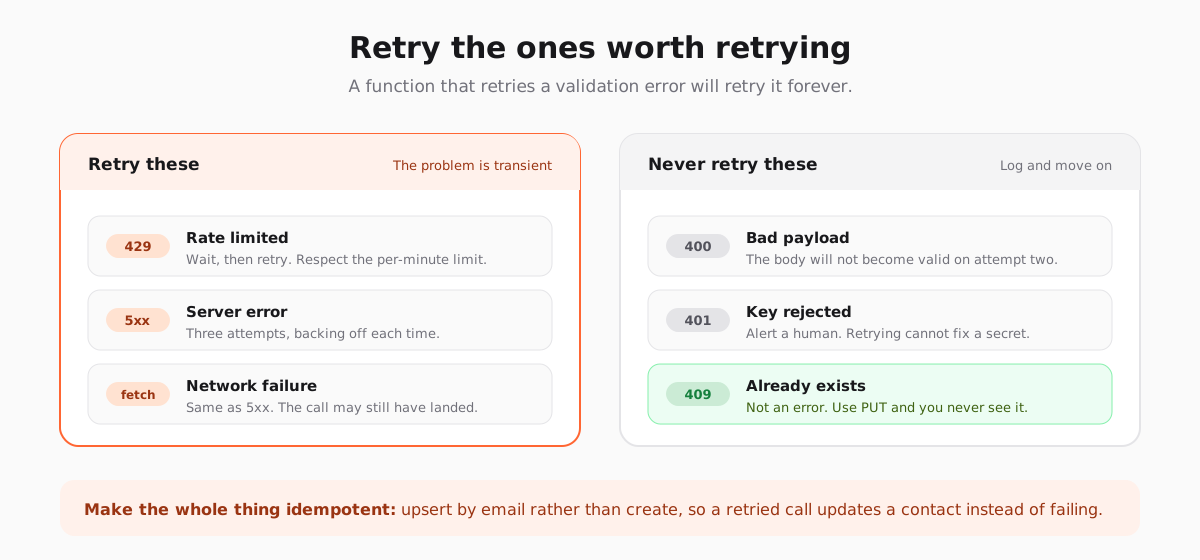
The helper above throws on any non-2xx response, which means the function returns a 500 and Supabase logs it. That is better than silence, but it treats a malformed email address the same as a rate limit, and those need opposite responses.
const RETRYABLE = new Set([429, 500, 502, 503, 504]);

async function withRetry<T>(call: () => Promise<T>, attempts = 3): Promise<T> {
  for (let attempt = 1; ; attempt += 1) {
    try {
      return await call();
    } catch (error) {
      const status = error instanceof ApiError ? error.status : 0;
      const transient = status === 0 || RETRYABLE.has(status);
      if (!transient || attempt >= attempts) throw error;
      await new Promise((resolve) => setTimeout(resolve, 2 ** attempt * 250));
    }
  }
}
A status of 0 covers the case where fetch itself rejected, which usually means the request never arrived but occasionally means the response was lost on the way back. The upsert makes that ambiguity safe: if the first call did land, the retry updates the same contact rather than creating a second one.
- Rate limits are per API key, per minute, and depend on the plan. A burst of signups is the usual cause, and the fix is backing off rather than asking for a higher limit.
- Validation errors should be logged with the payload that caused them. They are almost always a missing email or a custom property that does not exist yet.
- A 401 means the key was revoked or the secret was never set in the environment you deployed to. Check
supabase secrets listbefore you check anything else.
Run it locally before you deploy it
Edge Functions run locally with the same runtime they use in production, so there is little excuse for discovering a typo in a deploy. Put the secrets in a local env file, serve the function, and post to it with curl.
# supabase/functions/.env.local  (git-ignored)
# SENDTIM_API_KEY=sk_test_xxxxxxxx
# WELCOME_AUTOMATION_ID=7c1f8e2a-...

supabase functions serve send-welcome --env-file supabase/functions/.env.local

curl -X POST http://localhost:54321/functions/v1/send-welcome \
  -H "Content-Type: application/json" \
  -d '{"email":"you+test@example.com","firstName":"Ana","plan":"free"}'
Use a plus-addressed version of your own inbox rather than a made-up address. Invented addresses hard bounce, and bounces on a new sending domain cost more than the five seconds the shortcut saves. If the automation is paused, the trigger call still succeeds and nothing sends, which is a useful way to test the plumbing without mailing anyone.
The same function, other events
Once the pattern is in place, every other lifecycle email is the same two calls with a different automation id. A row in subscriptions changing to past_due triggers the dunning sequence. An orders insert triggers the receipt. A projects row going quiet for thirty days triggers the nudge.
Pass the automation id in the request body rather than hardcoding one per function, and a single send-lifecycle-email function handles all of them. Keep the trigger-to-automation mapping in a small table if it starts to sprawl, so that adding an email becomes a row rather than a deploy.
What should stay out of this code is the distinction between a receipt and a campaign. Both leave through the same API, but transactional email has different rules about consent, timing and which sending domain it should use, and the platform is where that difference belongs.
Frequently asked questions
Can Supabase Edge Functions send email directly?
Not by themselves. Edge Functions run on Deno, which has no SMTP support in the way a Node process does, and Supabase does not include a mail server. You send by making an HTTPS request from the function to an email provider's API, which Deno handles with the built-in fetch and no dependencies.
Should I call the email API from a Postgres trigger?
Only through pg_net, which queues the request and returns immediately. A trigger that waits for an HTTP response holds the transaction open for as long as the third party takes to answer, so a slow provider becomes a slow signup and an outage becomes a failed insert.
Where do I store the API key for an Edge Function?
In Supabase secrets, set with `supabase secrets set` and read with `Deno.env.get`. Do not put it in the database, in a migration, or anywhere a client bundle can reach it. If a key ever appears in a repository or a browser, rotate it rather than deleting the commit.
How do I stop the function sending duplicate emails?
Upsert the contact by email instead of creating it, so a retried call updates the existing record rather than failing, and only retry responses that could succeed on a second attempt: 429, 5xx and network errors. A 400 will never become valid, so retrying it just multiplies the log noise.
How do I test an Edge Function that sends email?
Run `supabase functions serve` with a local env file and post to the function with curl, using a plus-addressed version of your own inbox. Keeping the target automation paused lets you exercise the whole path, including the API calls, without delivering anything to a real person.