On this page
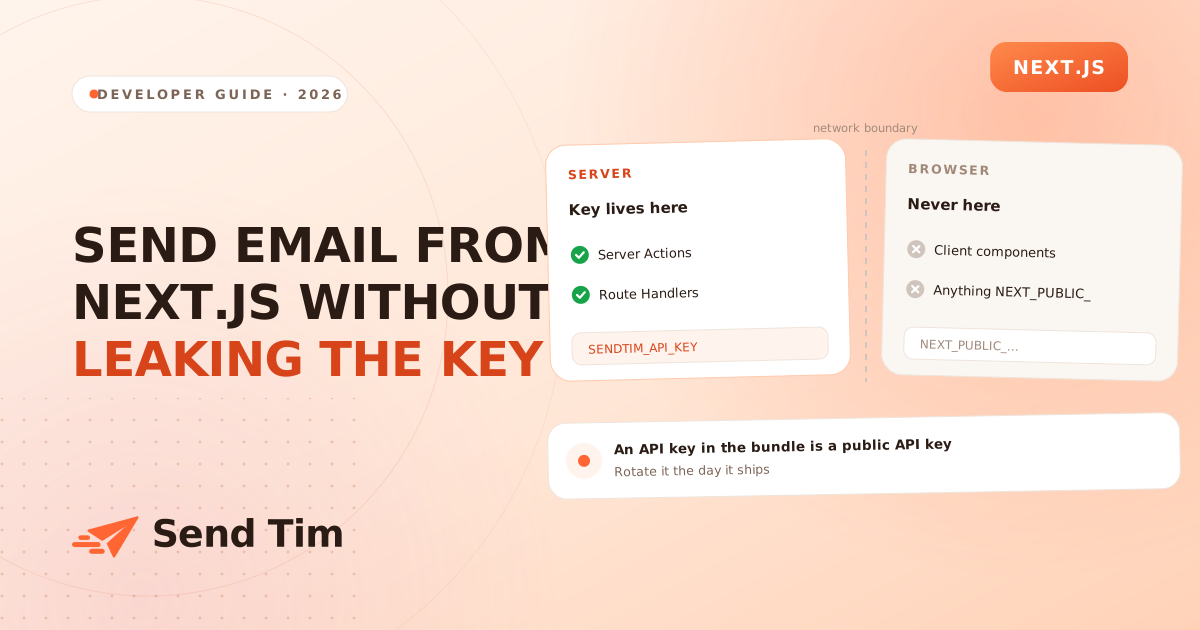
Every Next.js app eventually needs to send something: a welcome email after signup, a notification when a form is submitted, a receipt after checkout. The code to do it is four lines. The part that takes an afternoon is working out where those four lines are allowed to live, because Next.js runs your code in several places and only some of them can keep a secret.
This guide covers the boundary first, because a key in the wrong file is the one mistake here with a real cost, and then the two correct implementations and the latency problem nobody mentions until production.
Where code runs, and where the key may live
The App Router makes everything a Server Component by default, which is the safe default. The moment a file carries "use client", it and everything it imports are compiled into a JavaScript bundle and sent to the browser, where every string inside it is readable by anyone who opens DevTools.
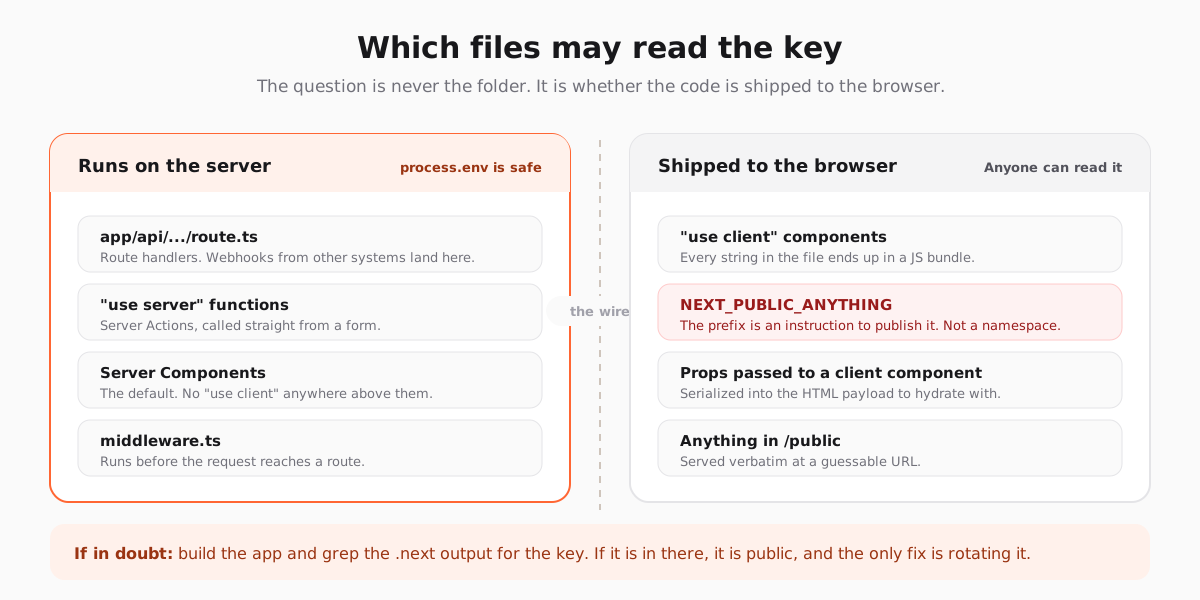
If you suspect a key has already gone out, do not reason about it. Build the app and search the output. If it is there, the only remedy is rotating the key, because the deployed bundles are already cached in browsers and CDNs you do not control.
npm run build
grep -r "sk_live" .next/static | head

# Any hit at all means the key is public. Rotate it, then fix the file.
A Server Action for your own form
When the caller is a form in your own app, a Server Action is the least machinery for the job. There is no endpoint to secure separately, no fetch to write on the client, and the function never leaves the server.
"use server";

import { z } from "zod";

const schema = z.object({
  email: z.string().email(),
  firstName: z.string().max(120).optional(),
});

const API = "https://sendtim.com/api/v1";

export async function subscribe(_: unknown, formData: FormData) {
  const parsed = schema.safeParse({
    email: formData.get("email"),
    firstName: formData.get("firstName") || undefined,
  });

  if (!parsed.success) {
    return { ok: false, error: "Enter a valid email address." };
  }

  const response = await fetch(`${API}/contacts`, {
    method: "PUT",
    headers: {
      // Read on the server only. Never NEXT_PUBLIC_.
      Authorization: `Bearer ${process.env.SENDTIM_API_KEY}`,
      "Content-Type": "application/json",
    },
    body: JSON.stringify({
      ...parsed.data,
      source: "website",
      consentGiven: true,
      consentSource: "signup_form",
      listIds: [process.env.NEWSLETTER_LIST_ID],
    }),
  });

  if (!response.ok) {
    console.error("subscribe failed", response.status, await response.text());
    return { ok: false, error: "Something went wrong. Try again." };
  }

  return { ok: true };
}
The client side is a form that points at it, with useActionState giving you the pending state and the returned message without any fetch code at all.
"use client";

import { useActionState } from "react";
import { subscribe } from "@/app/actions/subscribe";

export function SubscribeForm() {
  const [state, action, pending] = useActionState(subscribe, null);

  return (
    <form action={action}>
      <input type="email" name="email" required />
      <button disabled={pending}>{pending ? "Joining…" : "Join"}</button>
      {state?.ok ? <p>Check your inbox to confirm.</p> : null}
      {state?.error ? <p role="alert">{state.error}</p> : null}
    </form>
  );
}
Note what is not in the client file: no key, no API host, no request body. The only thing crossing the wire is the form data and the result.
A Route Handler for everyone else
Server Actions are for your own UI. When the caller is Stripe, a Supabase trigger, a cron job or a mobile app, you need a real endpoint, and a Route Handler is it. The important difference is that you now own authentication, because the URL is reachable by anyone who finds it.
import { after } from "next/server";

export async function POST(request: Request) {
  const secret = request.headers.get("x-webhook-secret");
  if (secret !== process.env.WEBHOOK_SECRET) {
    return Response.json({ error: "unauthorized" }, { status: 401 });
  }

  const { email, orderId, total } = await request.json();

  // Answer the caller now; do the slow part after the response.
  after(async () => {
    try {
      await sendReceipt({ email, orderId, total });
    } catch (error) {
      console.error("receipt failed", orderId, error);
    }
  });

  return Response.json({ received: true });
}
Compare a constant-time secret rather than === if the endpoint is public enough to be worth attacking, and return 401 before reading the body so an unauthenticated caller cannot make you parse arbitrary JSON.
Do not make the user wait for the email
An email API call takes a few hundred milliseconds on a good day. Awaiting it inside the request means the button spins for the whole round trip, and on a cold serverless function it can be over a second before anything appears to happen.
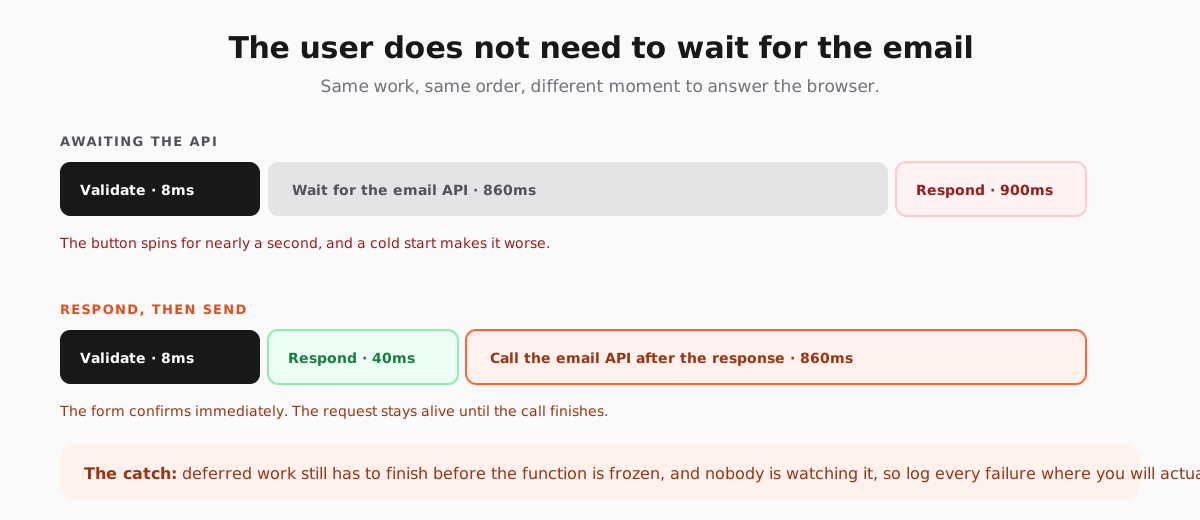
Next.js provides after() for exactly this: work scheduled inside it runs once the response has been sent, while the serverless function is still alive. It is the right tool when the user does not need to know the outcome, which covers welcome emails, receipts and internal notifications.
- Use `after()` when a failure should not change what the user sees. A welcome email that fails is a log line, not an error page.
- Await the call when the result is the point. A password reset where you claim "check your inbox" but the send failed is worse than an honest error.
- Use a queue once failures need to survive a crashed function.
after()keeps the work in the same invocation, so a hard timeout takes it with it. - Never fire and forget without a catch. An unhandled rejection in deferred work is invisible, which is the worst property a bug can have.
One more detail that catches people out: a Server Action is a POST endpoint too. Next.js generates an id for it and the browser calls it like any other route, so an action is not private merely because there is no file in app/api. Validate the input in the action itself rather than relying on the form that normally calls it, because nothing stops someone calling it with different data.
Rate limit anything unauthenticated
A public subscribe endpoint is a free contact-creation API, and bots find those quickly. Without a limit, a single afternoon can add thousands of fake addresses to your list, which hard bounce on the next campaign and take your sending reputation down with them.
const seen = new Map<string, number[]>();
const WINDOW = 60_000;
const MAX = 3;

export function allow(key: string): boolean {
  const now = Date.now();
  const hits = (seen.get(key) ?? []).filter((at) => now - at < WINDOW);
  if (hits.length >= MAX) return false;
  hits.push(now);
  seen.set(key, hits);
  return true;
}
An in-memory map is enough to stop casual abuse on a single instance, and wrong the moment you scale horizontally, because each instance has its own map. Move it to Redis or your database before you rely on it. Pair it with a honeypot field and double opt-in, which together mean that a fake address never becomes a mailable contact: signup form tactics goes into why that matters more than the form's conversion rate.
Keep the email out of your codebase
It is tempting to build the HTML in the Next.js app, because that is where the components are. It is a decision you regret about four emails in, when a copy change needs a deploy, the dark mode rendering is wrong in Outlook, and nobody can preview anything without running the app.
Keep the trigger in code and the content in the email platform. Your action upserts the contact and tells the platform which automation to run; the automation owns the copy, the branding, the timing and the suppression check. The code stops changing, which is the point. Email design covers why that rendering problem is harder than it looks.
If your data lives in Supabase rather than in the Next.js app, the same two calls work from an Edge Function instead: sending email from Supabase Edge Functions covers the database trigger version of this.
Frequently asked questions
Can I call an email API from a client component in Next.js?
Not with a secret key. Anything inside a file marked "use client" is compiled into a browser bundle, so the key would be readable by every visitor. Call the API from a Server Action or a Route Handler, and let the client component call that instead.
What does NEXT_PUBLIC_ actually do?
It tells the Next.js compiler to inline the value at build time wherever the variable is referenced, including in code sent to the browser. It is a publishing instruction rather than a namespace, so a secret with that prefix is public from the moment you deploy and has to be rotated rather than hidden.
Should I use a Server Action or a Route Handler to send email?
A Server Action when the caller is a form in your own app, because there is no separate endpoint to secure. A Route Handler when the caller is anything else: a payment provider webhook, a cron job, a mobile client or another service. The Route Handler is a public URL, so it needs its own authentication.
How do I stop a slow email API from slowing down my form?
Return the response first and run the API call in `after()`, which executes once the response has been sent while the function is still alive. Await the call only when the user genuinely needs the outcome, such as a password reset, where claiming success for a send that failed is worse than an error.
Do I need a queue to send email from Next.js?
Not at first. `after()` handles the latency problem and a retry inside it handles transient failures. You need a queue once a failure must survive the function being killed, or once you need ordered delivery and visibility into a backlog, which usually arrives with real volume rather than on day one.