On this page
- Define what counts as an abandoned cart
- A practical three-email cart recovery sequence
- Email one: restore the shopping context
- Email two: remove a real source of uncertainty
- Email three: close the sequence honestly
- Use subject lines that match the message
- Add safeguards before activation
- Measure recovery without overstating it
People leave carts for ordinary reasons: they were interrupted, wanted to compare options, could not find a delivery answer, or were not ready to buy. A recovery email cannot know which reason applies. Its first job is to restore the cart and make the next decision easy, without pretending that every shopper needs urgency or a discount.
The best sequence depends on the buying cycle, product price, stock model and data available from the store. The structure below is a starting point for planning and testing. Confirm that your ecommerce integration can observe cart and purchase events reliably before you promise an exact journey.
Define what counts as an abandoned cart
A product view is not a cart, and a cart is not always a checkout. Decide which event starts the sequence and whether you have permission and an email address at that point. A checkout-start event usually shows stronger intent than adding an item to a cart, but it also occurs later. Document the event name, the fields it includes and how long the cart link remains valid.
- Entry: a known contact starts a cart or checkout that remains incomplete for a defined period.
- Exit: a matching purchase completes, the cart expires, the contact opts out, or the address becomes suppressed.
- Identity: the integration can connect the cart and purchase to the same person without unsafe assumptions.
- Inventory: the message does not promise that an item remains available unless stock is checked at send time.
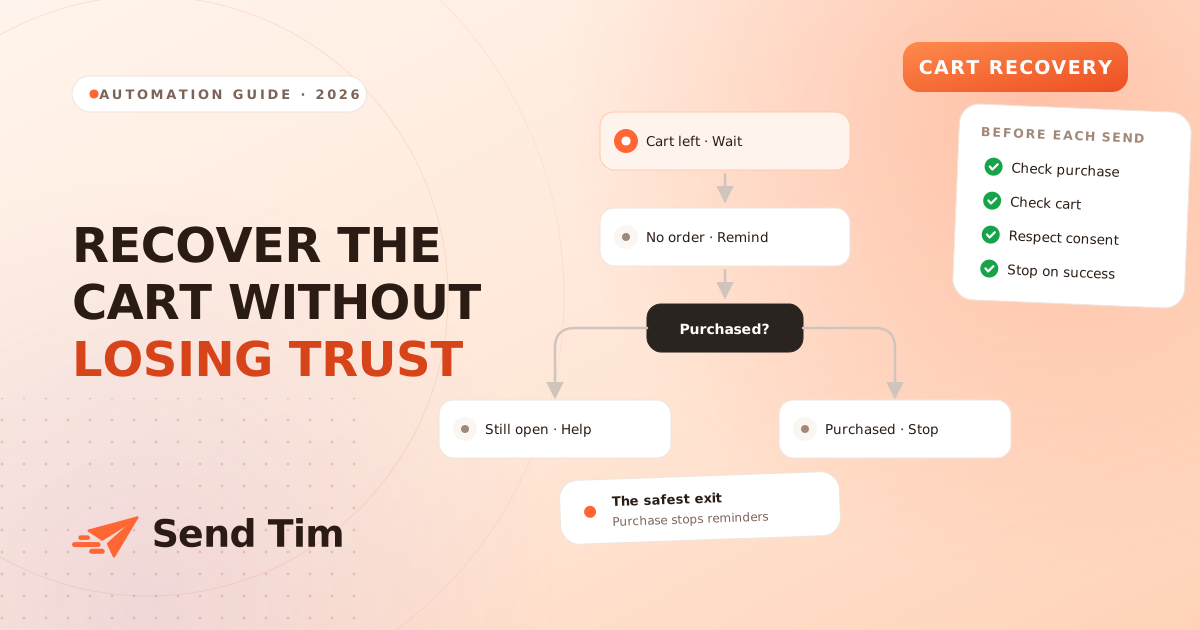
Treat the purchase check as part of every step rather than a final cleanup. Events can arrive late or out of order. If your data cannot exclude recent buyers confidently, use cautious wording and a shorter sequence. A mistaken reminder after purchase damages trust faster than a missed recovery email.
A practical three-email cart recovery sequence
| Message | Possible timing | Job |
|---|---|---|
| Reminder | A few hours after abandonment | Restore the cart and show the selected items |
| Decision support | About a day later | Answer delivery, returns, sizing or compatibility questions |
| Final prompt | Two or three days later | Give a truthful last reminder before the sequence ends |
These delays are examples, not benchmarks. A grocery order, concert ticket and considered furniture purchase have different decision windows. Begin with enough time for a shopper to finish naturally. Review actual order timing, then test one change at a time. If the second message adds no useful information, remove it instead of sending it because a template included three steps.
Email one: restore the shopping context
Show the store name, selected items and a direct route back to the cart. Use product names as text and include useful image descriptions. If the cart link expires or reconstructs items with current prices, explain that clearly. Avoid claiming that stock is reserved unless the commerce system really reserves it for the stated period.
Keep the sender recognizable and the reply route useful. If people commonly need help with fit, compatibility or shipping, link to the relevant information beside the cart button. Do not bury the cart under a catalogue of recommendations that sends attention away from the decision already in progress.
Email two: remove a real source of uncertainty
Use support questions and checkout feedback to choose what belongs here. Delivery dates, returns, payment options, sizing and installation can all block a purchase. Pick the obstacle most relevant to the product or segment. A generic list of benefits is less useful than a precise answer with a link to the full policy.
Only state terms that match the current policy and the shopper’s region. If conditions vary, link to the right version and avoid compressing away important exceptions. The email should reduce uncertainty, not create a promise that customer support later has to correct.
Email three: close the sequence honestly
A final reminder can be short. Say that this is the last email in the cart sequence, restate the useful next step and let the shopper decide. A deadline belongs here only when something really expires: a cart, a published offer or a valid stock reservation. Do not use a countdown that resets when the page reloads.
Discounts are optional. Offering one immediately can teach repeat customers to wait and can spend margin on orders that would have happened anyway. If you test an incentive, define eligibility, exclusions and a control group where volume permits. Compare net contribution after the discount, not only the number of recovered carts.
Use subject lines that match the message
| Purpose | Subject line example | Avoid |
|---|---|---|
| Reminder | Your cart is ready when you are | Pretending an order was placed |
| Help | A quick answer about delivery | A vague “You forgot something” |
| Real stock limit | An item in your cart is running low | False scarcity without a stock check |
| Final sequence email | One last cart reminder from us | A deadline that does not exist |
Specific and accurate usually beats mysterious. The subject line, preview text and body should describe the same situation. See the email subject line guide for a broader review process and examples.
Add safeguards before activation
- Purchase check: evaluate the latest order state before every queued message.
- Frequency control: account for promotional campaigns and other automations reaching the same person.
- Cart validity: test links for guests, signed-in shoppers, changed prices and removed variants.
- Privacy and consent: use only the events and marketing permissions appropriate to your setup and market.
- Fallback content: handle missing images, product names and prices without broken sentences.
- Support ownership: monitor replies and know who can pause the automation when checkout fails.
Test the complete journey with fresh addresses and real test orders. Start a cart, wait for enrollment, complete a purchase before the next step and confirm that the sequence stops. Then test an expired cart and an unsubscribe. These paths reveal more than previewing the email blocks separately. The automation guide explains how to map triggers, conditions and exits.
Measure recovery without overstating it
Track eligible carts, delivered messages, return-to-cart clicks and completed orders over a consistent window. Separate revenue from margin after discounts, returns and shipping support. Compare by product type or cart value only when the groups are large enough to support a useful conclusion.
An order after an email is not proof that the email caused it; some shoppers would have returned on their own. A randomized holdout can estimate incremental recovery when volume and tooling allow. Otherwise, label attributed results honestly and watch complaints, unsubscribes and post-purchase replies for signs that the sequence is too aggressive.
Frequently asked questions
How many abandoned cart emails should I send?
One to three is a sensible starting range. Each message needs a distinct job, such as restoring the cart or answering a common question. Stop early when a purchase completes, the cart expires or another exclusion applies.
When should the first abandoned cart email be sent?
A few hours after the qualifying event is a common starting point, but the right delay depends on the product and buying cycle. Leave time for the shopper to finish naturally, then use your own order timing to refine the delay.
Should an abandoned cart email include a discount?
Not automatically. First restore the cart and answer likely questions. If you test an incentive, define eligibility and measure margin after the discount. A control group can help show whether the offer generated incremental orders.
What should stop an abandoned cart sequence?
A matching purchase, expired or invalid cart, unsubscribe, suppression or another condition that makes the message inappropriate should stop it. Check the latest state before every send because commerce events may arrive late.